
SonarQube Reports API#
This article describes how to programmatically access SonarQube security reports stored in the Procurize platform. It covers the REST API for listing reports and downloading them in HTML, PDF, and ZIP formats.
Overview#
The SonarQube Reports submodule allows organizations to centrally store and manage security and code quality reports generated by SonarQube. The Procurize platform exposes this data through a public REST API that allows you to:
- List report metadata for an organization, a project group, or a project
- Download a single report in HTML, PDF, or ZIP format
- Download selected reports as a ZIP archive
- Download all reports of a project or a project group as a ZIP archive
- Fetch the latest OWASP Top 10 and CWE Top 25 reports directly from a SonarQube service
These capabilities enable integrations with CI/CD pipelines, GRC systems, internal dashboards, and third-party risk management tools.
Endpoints#
| Endpoint | Method | Purpose |
|---|---|---|
/security/report/list | GET | List report metadata for the selected scope and version. |
/security/report/files | GET | Download the selected reports as a ZIP archive. |
/security/report/html | GET | Get a single report as HTML. |
/security/report/pdf | GET | Get a single report as PDF. |
/security/report/zip | GET | Get a single report as a ZIP archive. |
/security/report/project-files | GET | Download all reports of a project as a ZIP archive. |
/security/report/directory-files | GET | Download all reports of a project group (directory) as a ZIP archive. |
/security/reports/fetch | POST | Fetch the latest reports from a SonarQube service. |
Authentication and Authorization#
The report listing and download endpoints described in this article do not require authentication.
The POST /security/reports/fetch endpoint requires authentication with an API token — see API Tokens.
Organization ID#
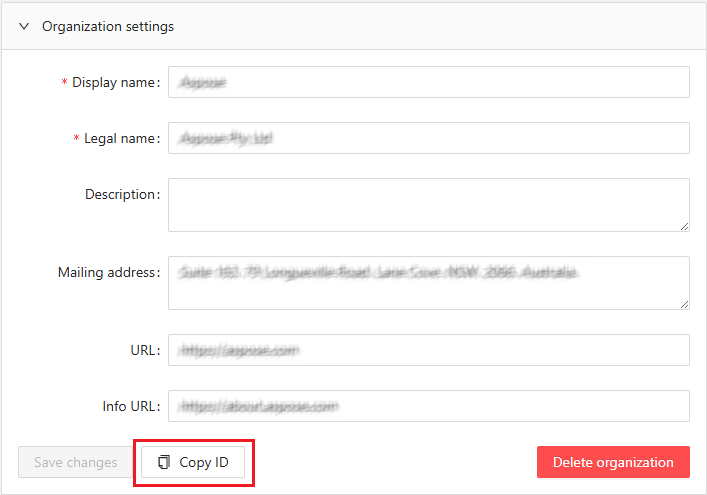
An organization identifier is required for most requests described here. You can pass either the organization ID (a UUID) or its alias — see Identifiers and Aliases. You can find it in the Organization’s settings panel at https://dashboard.procurize.ai. Please note that access to the settings panel requires authorization, and access to the organization’s settings panel requires a user role of at least Administrator in that organization.
Identifiers and Aliases#
Scope parameters accept either the entity ID (a UUID) or a human-readable alias. Aliases make requests easier to read and are stable across environments.
| Parameter | Accepts | Example aliases |
|---|---|---|
org | Organization ID or alias | aspose, groupdocs |
directory | Directory (project group) ID or alias | aspose-imaging, groupdocs-annotation |
project | Project ID or alias | aspose-imaging-net, groupdocs-annotation-java |
For example, the following two requests are equivalent:
curl "https://api.procurize.com/security/report/list?org=00000000-0000-0000-0000-000000000001&version=1.0"
curl "https://api.procurize.com/security/report/list?org=aspose&version=1.0"
Note: Aliases are not supported for the
idparameter of the bulk download endpoints. Pass the directory or project UUID toGET /security/report/project-filesandGET /security/report/directory-files.
Base URL#
All REST API endpoints are served under the following base URL:
https://api.procurize.com
SonarQube Reports REST API#
List Reports#
Returns the security reports available for the selected scope and version, without their file contents. Use this endpoint to discover report IDs that can be passed to the download endpoints.
Endpoint
GET /security/report/list
Query Parameters
org(optional): Organization ID or alias (for example,asposeorgroupdocs). Widest scope.directory(optional): Directory (project group) ID or alias (for example,aspose-imagingorgroupdocs-annotation). Narrower scope.project(optional): Project ID or alias (for example,aspose-imaging-netorgroupdocs-annotation-java). Narrowest scope.version(optional): Exact project version.minver(optional): Minimum project version.maxver(optional): Maximum project version.
At least one of the scope parameters org, directory, or project is required. The scopes are prioritized as follows: if project is specified, only that project is searched; otherwise, if directory is specified, the whole project group is searched; otherwise, the whole organization (org) is searched. When org is specified together with project or directory, the target is additionally validated to belong to that organization.
At least one of version, minver, or maxver is required. If version is specified, minver and maxver are ignored.
Request Example
curl "https://api.procurize.com/security/report/list?org=aspose&version=1.0"
Scoping to a project group or a project by alias:
curl "https://api.procurize.com/security/report/list?directory=aspose-imaging&minver=1.0&maxver=2.0"

curl "https://api.procurize.com/security/report/list?project=aspose-imaging-net&version=1.0"
Response Example
{
  "organizationId": "00000000-0000-0000-0000-000000000001",
  "reports": [
    {
      "projectName": "Test product",
      "id": "00000000-0000-0000-0000-000000000002",
      "reportType": "CWE Top 25",
      "reportVersion": 2024,
      "projectVersion": "1.0",
      "date": "2025-12-17T09:05:48.5946432+00:00",
      "uploadDate": "2025-12-17T09:05:48.5946432+00:00",
      "vulnerabilitiesCount": 0,
      "securityRating": "A"
    }
  ]
}
Response Fields
organizationId: The organization the reports belong to.reports[].id: Unique report ID. Pass this value to the download endpoints.reports[].projectName: Display name of the product.reports[].projectVersion: Version of the product.reports[].reportType: Report type (OWASP Top 10orCWE Top 25).reports[].reportVersion: Version (year) of the report standard.reports[].date: Date the report was generated.reports[].uploadDate: Date the report was uploaded to Procurize.reports[].vulnerabilitiesCount: Number of vulnerabilities found.reports[].securityRating: Overall security rating (A–E, whereAis the best).
Download Reports by ID#
Downloads a ZIP archive containing the selected reports. Each report is included in both HTML and PDF formats.
Endpoint
GET /security/report/files
Query Parameters
org(required): Organization ID or alias (for example,asposeorgroupdocs).reports(required): Report IDs to include. Repeat the parameter to include multiple reports.
Request Example
curl "https://api.procurize.com/security/report/files?org=aspose&reports=00000000-0000-0000-0000-000000000002&reports=00000000-0000-0000-0000-000000000003" -o reports.zip
Response
- Content-Type:
application/zip - The response body contains the binary ZIP file.
Clients should stream the response and save it to disk.
Working with a Single Report#
The /security/report/html, /security/report/pdf, and /security/report/zip endpoints return one specific report and share the same selection rules.
Report Selection#
The report type and version are always required:
rt(required): Report type. Supported values areOWASP Top 10andCWE Top 25.rv(required): Report version — the year of the standard edition, for example2025for OWASP Top 10 or2024for CWE Top 25.
The exact report is then selected in one of two ways:
- By report ID — pass
id(report ID) together with eitherproject(project ID or alias) ororg(organization ID or alias). Do not passversionin this mode. - By project version — pass
project(project ID or alias, for exampleaspose-imaging-netorgroupdocs-annotation-java) andversion(project version). Theorgparameter is not used in this mode.
When project and org are both specified, org is ignored.
Get Report as HTML#
Renders a single report as an HTML page, or returns it as a downloadable HTML file.
Endpoint
GET /security/report/html
Query Parameters
rt(required): Report type.rv(required): Report version.- Report selection parameters: see Report Selection.
download(optional): Set totrueto return the HTML as a file download (Content-Disposition: attachment). When omitted orfalse, the report is returned inline.
Request Example
curl "https://api.procurize.com/security/report/html?rt=OWASP+Top+10&rv=2025&id=00000000-0000-0000-0000-000000000004&project=aspose-imaging-net"
To download the HTML file instead of rendering it inline:
curl "https://api.procurize.com/security/report/html?rt=OWASP+Top+10&rv=2025&project=aspose-imaging-net&version=1.0&download=true" -o report.html
Response
- Content-Type:
text/html
Get Report as PDF#
Returns a single report as a PDF document.
Endpoint
GET /security/report/pdf
Query Parameters
rt(required): Report type.rv(required): Report version.- Report selection parameters: see Report Selection.
Request Example
curl "https://api.procurize.com/security/report/pdf?rt=CWE+Top+25&rv=2024&project=aspose-imaging-net&version=1.0" -o report.pdf
Response
- Content-Type:
application/pdf
Get Report as ZIP#
Returns a single report as a ZIP archive that contains both the HTML and PDF versions.
Endpoint
GET /security/report/zip
Query Parameters
rt(required): Report type.rv(required): Report version.- Report selection parameters: see Report Selection.
Request Example
curl "https://api.procurize.com/security/report/zip?rt=CWE+Top+25&rv=2024&id=00000000-0000-0000-0000-000000000004&org=groupdocs" -o report.zip
Response
- Content-Type:
application/zip
Download All Reports of a Project#
Downloads a ZIP archive containing all reports of the specified project, in both HTML and PDF formats.
Endpoint
GET /security/report/project-files
Query Parameters
id(required): Project ID. Aliases are not supported; pass the project UUID.rt(optional): Filter by report type. Supported values areOWASP Top 10andCWE Top 25.rv(optional): Filter by report version (year).version(optional): Filter by project version.
If no filters are specified, all reports of the project are included. Filter parameters can be combined and are applied independently.
Request Example
curl "https://api.procurize.com/security/report/project-files?id=00000000-0000-0000-0000-000000000005" -o project-reports.zip
Response
- Content-Type:
application/zip
Download All Reports of a Project Group#
Downloads a ZIP archive containing reports of all projects in the specified directory (project group), in both HTML and PDF formats.
Endpoint
GET /security/report/directory-files
Query Parameters
id(required): Directory (project group) ID. Aliases are not supported; pass the directory UUID.rt(optional): Filter by report type. Supported values areOWASP Top 10andCWE Top 25.rv(optional): Filter by report version (year).version(optional): Filter by project version.
If no filters are specified, reports of all projects in the directory are included. Filter parameters can be combined and are applied independently.
Request Example
curl "https://api.procurize.com/security/report/directory-files?id=00000000-0000-0000-0000-000000000006" -o directory-reports.zip
Response
- Content-Type:
application/zip
Fetch Reports from SonarQube#
Uploads the latest security report data for a product from a SonarQube service to Procurize. The service retrieves the latest issue data from SonarQube, converts it into JSON representations of the latest versions of the OWASP Top 10 and CWE Top 25 reports, and returns them in the response.
Endpoint
POST /security/reports/fetch
Authentication
This endpoint requires an API token, passed in the X-API-Key header. For details on generating and using tokens, see API Tokens.
Query Parameters
The SonarQube source is selected in one of two ways:
- By project — pass
project(project ID or alias — see Identifiers and Aliases). Do not passurlorkey. - By SonarQube service — pass
url(SonarQube service URL) andkey(SonarQube project key) together. Do not passproject.
Request Example
Fetch the report for a project by its alias:
curl -X POST "https://api.procurize.com/security/reports/fetch?project=aspose-imaging-net" \
  -H "X-API-Key: YOUR_API_TOKEN"
Fetch the report directly from a SonarQube service:
curl -X POST "https://api.procurize.com/security/reports/fetch?url=https://sonarqube.example.com&key=my-project-key" \
  -H "X-API-Key: YOUR_API_TOKEN"
Response Example
{
  "Owasp10_2025": {
    "TOTAL_SECURITY_RATING": "A",
    "TOTAL_COUNT": 0,
    ...
  },
  "Cwe25_2025": {
    "TOTAL_SECURITY_RATING": "A",
    "TOTAL_COUNT": 0,
    ...
  }
}
The response is useful in release build pipelines to decide whether to stop a build when vulnerabilities are detected in the public security report formats.
Notes
- Uploading a report requires personal permission for the product the reports belong to. If you do not have this permission, send the request anyway: the platform returns
403 Forbiddenand automatically notifies the platform administrators, who review the request and notify you of the decision. - Not every SonarQube service may be registered on the Procurize platform. To register a new service, contact your platform administrator; an administrator token for that service is required.
Error Handling#
The API uses standard HTTP status codes.
200 OK: Request successful204 No Content: Report does not exist400 Bad Request: Invalid parameters or malformed request401 Unauthorized: Missing or invalid API token403 Forbidden: Access denied (for example, missing permission for the product)500 Internal Server Error: Unexpected server error
Error responses include a machine-readable error code and a human-readable message.