
Ask AI with your knowledge base#
Get answers grounded in your own documents and questionnaires – now with visible sources and one‑click navigation to the original content.
Applies to: Procurize.AI Knowledge Base → Ask AI page
Data source: Public documents + FAQ collections (optionally scoped by project)
Overview#
The Ask AI feature allows you to ask questions using your organization’s knowledge base as the sole source of truth. Answers are generated by AI based on public knowledge base elements, including:
- Documents (any text fragment from your uploaded files)
- FAQ collections (questions and answers from your questionnaires)
This feature is commonly used to answer questions related to policies, security, compliance, and organizational processes.
New: Every AI response now shows exactly which sources were used – with clickable links to open the original document or questionnaire fragment.
Asking a Question#
To ask a question:
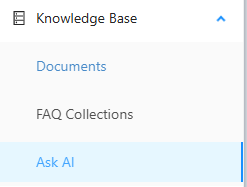
- Navigate to the Knowledge Base > Ask AI page.
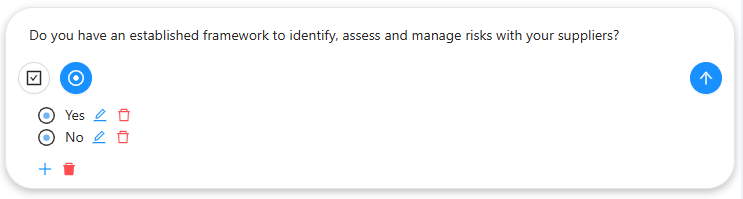
Enter your question in the input field.
- Questions can be open-ended (e.g., “What is our data retention policy?”)
- Questions may relate to policies, security, compliance, or internal procedures
(Optional) Specify acceptable answer options for:
- Single-choice answers
- Multiple-choice answers
This is especially useful when answering structured questionnaires or RFPs.
Limiting the Knowledge Scope#
In the settings panel, you can select a target project (workspace).
- Limits the set of documents and FAQ collections used to generate answers
- Helps improve relevance for project-specific questions

✨ New: Viewing Sources Used for Any Answer#
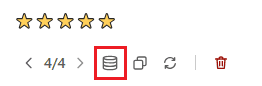
When the AI returns an answer, the response panel now includes a “Sources used” button.
How it works#
- After you receive an AI answer, look for “Sources used” below the response text.
- Click the button → a list expands or a modal opens showing every knowledge base element that contributed to the answer.
Each source entry includes:
- Type – Document fragment or FAQ (question‑answer pair)
- Title / name – Document name or FAQ collection name
- Excerpt – A short snippet of the source text (the part the AI used)
- Link – Click to open the full document or questionnaire directly in your knowledge base
Navigation behavior#
- Document fragment link → opens the document viewer, scrolls to the exact fragment (paragraph, heading, or table cell).
- FAQ link → opens the questionnaire page, highlights the specific Q&A pair.
💡 This gives you full transparency: you can verify the AI’s answer against the original source in one click.
AI-Generated Answers and Confidence Rating#
When an answer is generated:
- The AI uses only public knowledge base content (documents + FAQs)
- The response includes a confidence rating on a 5-point scale (1 = very low, 5 = very high)
- The confidence score indicates how well the knowledge base supports the answer – higher scores mean multiple consistent sources.
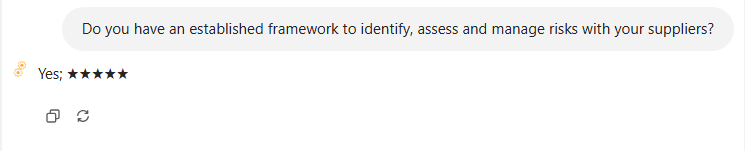
💡 Use the “Sources used” button to see why the confidence is high or low. Low confidence answers often come from a single, weak, or outdated source.
Example Workflow – Verifying an AI Answer#
- You ask: “What is the maximum liability cap in supplier contracts?”
- AI answers: “$1,000,000 for general contracts, $500,000 for IT services.” (Confidence: 4/5)
- You click “Sources used” → list shows:
- “Master Supply Agreement v3.2” (paragraph 7.4) – excerpt: “Liability capped at $1M…”
- “IT Vendor Policy” (FAQ #12) – excerpt: “IT services liability cap is $500k…”
- You click the first link → document opens at the exact clause.
- You confirm the AI is correct and use the answer in your RFP response.
Key Points#
| Feature | Description |
|---|---|
| Knowledge sources | Documents + FAQ collections (public only) |
| Question types | Open‑ended, single‑choice, multiple‑choice |
| Project scoping | Limit sources to a specific workspace |
| Confidence rating | 5‑point scale (transparency on answer strength) |
| Sources used button | NEW – shows every source with clickable links to original content |
| Navigation | Opens document at exact fragment or FAQ at specific Q&A |
Frequently Asked Questions (FAQ)#
Q: Does Ask AI use private or draft documents?
A: No – only public knowledge base elements (documents and FAQs marked as public). Drafts and private items are never included.
Q: Can I see which exact sentence the AI quoted?
A: Yes – the “Sources used” list includes an excerpt (short snippet of the source text). Click the link to see the full context.
Q: What if the AI answer has no “Sources used” button?
A: That means the answer was generated from general AI knowledge, not from your knowledge base. Ensure your question is scoped to a project with public content.
Q: Do sources include questionnaire responses (Q&A pairs)?
A: Yes – FAQs from questionnaires appear as sources, with links to the specific question in that questionnaire.
Q: Can I click a source link if I don’t have permission to view that document?
A: No – permissions are respected. If you cannot access the document normally, you will see an error message instead of the link.
Q: How does scoping affect the “Sources used” list?
A: Only sources within the selected project (workspace) are used. The list will never show elements from outside that scope.