
API Tokens | Procurize.AI#
Generate, manage, and use API tokens for secure programmatic access to your Procurize.AI workspace.
Applies to: Procurize.AI Dashboard → Settings → Tokens
Available on: Business & Enterprise plans
Required role: Security Manager, Editor, Admin or Maintainer
Overview#
API tokens enable secure, programmatic access to the Procurize.AI platform. You can use tokens to integrate Procurize.AI with your internal systems, automate workflows, or build custom applications on top of the platform.
Key characteristics:
- Tokens inherit all permissions of the user who created them
- Tokens are organization‑scoped – no need to specify
orgin API calls - Unlimited tokens can be generated
- Tokens can have expiration dates or be set to never expire
- Tokens can be deactivated and later reactivated as needed
🔒 Security note: Procurize.AI does not store the token value – only its hash. You must copy and save the token immediately after generation. It will not be shown again.
Accessing the Token Management Panel#
- Navigate to the Dashboard → API Tokens page.
- The token management panel displays your personal tokens associated with the current organization.
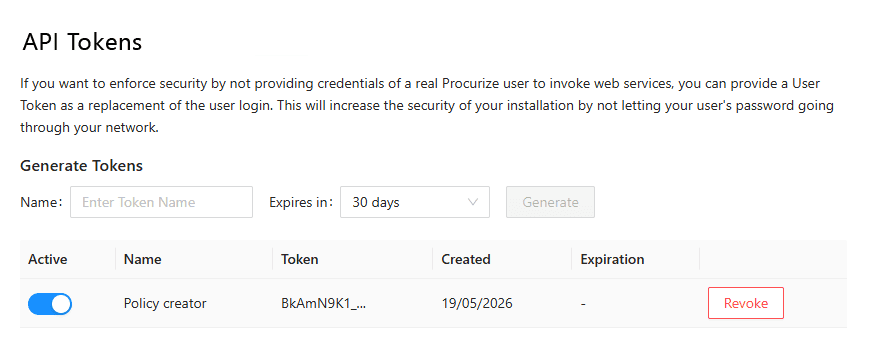
Permission required: Only users with Security Manager, Editor, Admin or Maintainer roles can access this panel. For detailed role definitions, see Permissions Overview .
Generating a New Token#
Enter a Name to identify the token’s purpose.
Select an expiration period:
- 1 month
- 3 months
- 1 year
- No expiration (unlimited validity)
Click “Generate”.
Important – Copy the Token Immediately#
After generation, the token value is displayed once – copy it and store it securely (e.g., in a password manager or environment variable).

⚠️ You will not be able to view the token value again. Procurize.AI stores only a secure hash for verification. If you lose the token, you must revoke it and generate a new one.
Managing Existing Tokens#
The Tokens panel displays a list of all generated tokens with their:
- Name
- Suffix
- Creation date
- Expiration date (or “-”)
- Status: Active or Inactive
Deactivating / Reactivating a Token#
- Deactivate – temporarily disables the token. You can reactivate it later when needed.
- Reactivate – restores a previously deactivated token to active status.
💡 Deactivation is useful for temporarily suspending integrations without deleting the token.
Revoking a Token#
- Revoke – permanently deletes the token. This action cannot be undone.
- If you lose a token, revoke it immediately and generate a new one.
Using an API Token#
Base URL & Authentication#
| Parameter | Value |
|---|---|
| Base URL | https://api.procurize.com |
| Authentication method | API key via header |
| Header | X-API-Key: <YOUR_API_TOKEN> |
Example Request (cURL)#
curl -X GET "https://api.procurize.com/v1/documents" \
  -H "X-API-Key: YOUR_API_TOKEN"
🧠 No organization ID needed – the token is bound to your organization, so the API resolves the context automatically.
Important Security & Usage Rules#
| Rule | Explanation |
|---|---|
| Token permissions | The token has exactly the same permissions as the user who created it. If the user’s role changes, the token’s permissions update accordingly. |
| Organization binding | Tokens are tied to the creator’s organization. You cannot use a token across multiple organizations. |
| Token visibility | The token value is shown only once. Store it immediately. Procurize.AI stores only a hash. |
| Expired tokens | Expired tokens are automatically deactivated and cannot be used. Generate a new token if needed. |
Troubleshooting#
| Issue | Solution |
|---|---|
| “Invalid API key” error | Check that the token is correctly copied (no extra spaces). Verify the token is still active and not expired. |
| Token not working after role change | The token’s permissions are updated to match the user’s current role. If the user lost permissions, the token also loses them. |
| Lost token | Revoke the lost token and generate a new one. |
| Rate limiting | API rate limits apply based on your plan. Check the X-RateLimit-* headers in the response. |
Related Topics#
- Permissions Overview – detailed role definitions
- Pricing Plans – which plans include API access
- REST API Reference – detailed endpoint documentation